RequiresiPhone XR or later · iOS 18+
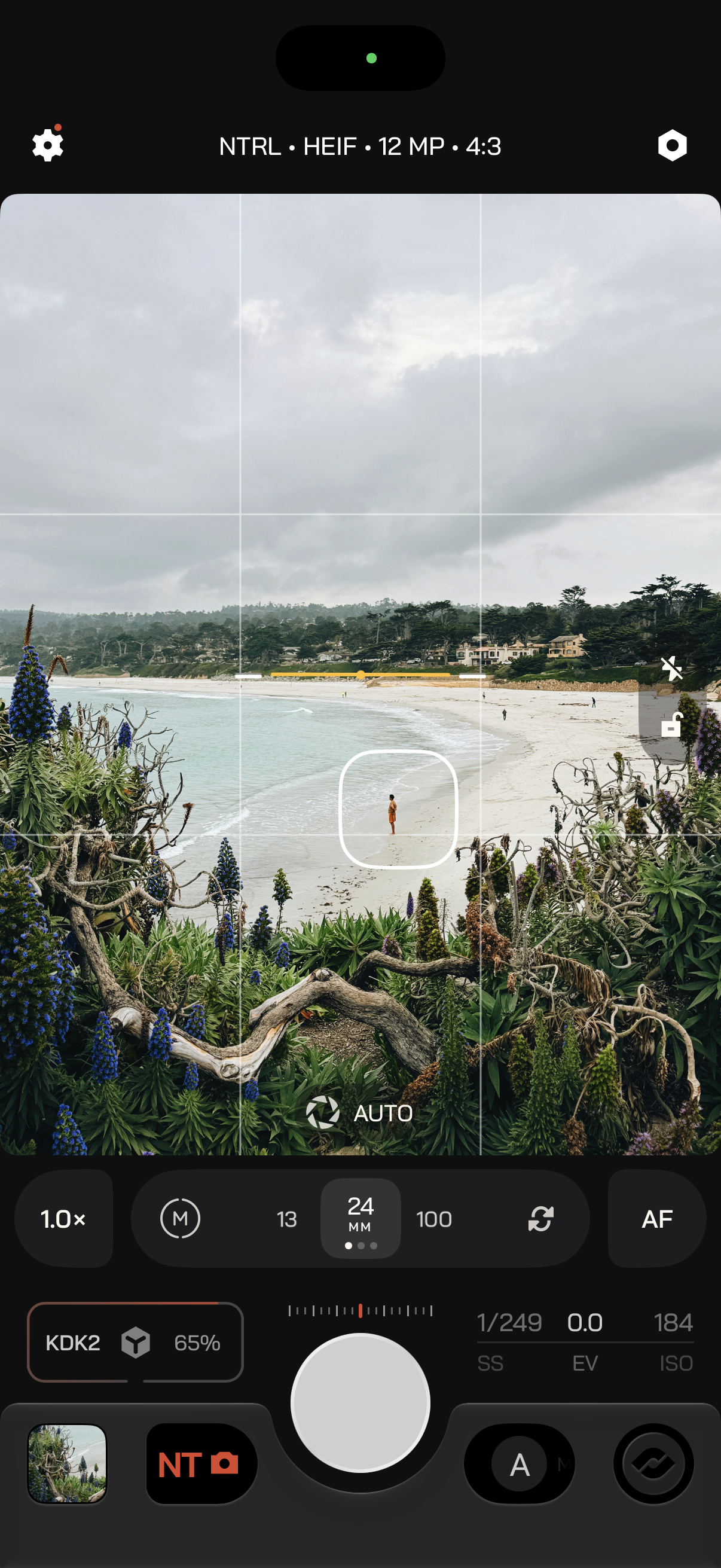
- 1
Settings
Choose your Action Plate, set preferences, and more.
- 2
Format Bar
Tap to format the current mode. Formatting options update according to your capture mode.
- 3
Hardware
Set up connected storage, microphones, monitors, and Apple Watch.
- 4
Viewfinder
Your live preview. The rest of the interface adapts to its aspect ratio.
- 5
Reticle
Tap the frame to place focus and the exposure spot meter. The spot meter is only in Auto priority.
- 6
Quick Actions
Swipe down on the viewfinder for utilities and tools that help you compose and capture.
- 7
Control Zone
Optics, focus, and zoom, plus exposure controls while you adjust exposure.
- 8
Action Plate
Your capture controls under your thumb: Looks, Color, Exposure, Modes, and the shutter.